1. Envelope components 101
The USPS and most national posts expect four core lines: sender (return), recipient name, delivery address, and locality line. Optional elements include unit/suite numbers and attention lines.
- Name line: Full legal name or company, no punctuation.
- Delivery line: Street + unit (e.g., 455 MARKET ST STE 800).
- Locality line: CITY STATE ZIP in uppercase; other countries rearrange but the principle stays.
- Country line: Required whenever sending internationally—destination country in English, uppercase.
2. USPS envelope address format
The standard USPS envelope address format is: name line, delivery line, then CITY STATE ZIP on one line (ZIP+4 allowed). Write in ALL CAPS, avoid commas and periods, and keep clear, dark ink. For international mail, add the destination country on the last line in English.
USPS sample
JORDAN LEE
455 MARKET ST STE 800
SAN FRANCISCO CA 94105-1234
International sample
SOFIA MARTINEZ
CALLE 50 #21-80
BOGOTÁ 110111
COLOMBIA
Add the country line last. Keep uppercase for clarity.
Need other countries? The formatter still covers Canada (ANA NAN), UK (separate post town and postcode lines), and Australia (locality + state abbrev + 4-digit postcode). Preview them in the Address Envelope Formatter to see exact casing and spacing.
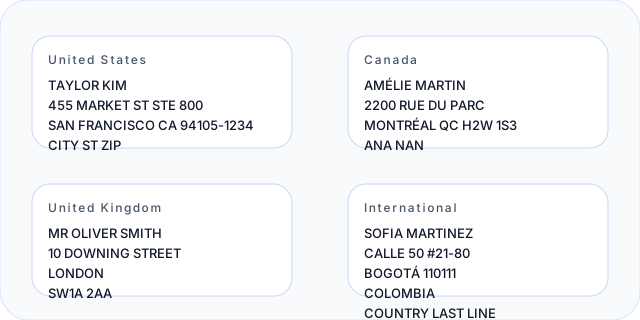
If you’re wondering how to write address on an envelope for USPS or the precise USPS address format on envelope, start with ALL CAPS, no punctuation, and mirror the sample above.
Copy-paste USPS block
Open in formatterJORDAN LEE
455 MARKET ST STE 800
SAN FRANCISCO CA 94105-1234Uppercase, no commas or periods. Add the country line last for international mail.
3. Address placement on the envelope
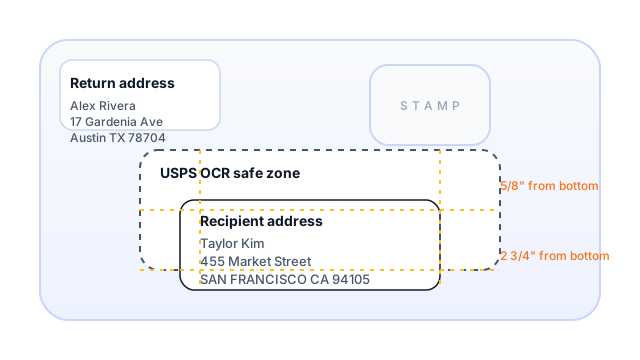
For correct address placement on envelope layouts: the return address (sender) lives in the top-left within roughly a 2" × 4" area. The recipient block belongs in the center, slightly below the horizontal midpoint, and entirely inside the USPS safe zone (between 5/8" and 2 3/4" from the bottom edge). Keep a clear margin for the stamp at the top-right.
If you ever ask “where to put the address on an envelope” or “where to write sender address on envelope,” anchor FROM in the top-left and TO in the mid-face. Toggle the safe-zone overlay in the formatter to see the machinable window.
4. Stamp position and orientation
The stamp goes in the top-right corner inside a small “safe rectangle.” Keep it clear of the address and barcodes. Horizontal or vertical orientation is fine—just avoid covering text or the stamp’s value.
For quick recall of stamp position on envelope and stamp orientation on envelope: top-right, tidy margin, no overlap with the address. If unsure, view the stamp box in the formatter before you place it.
5. Large, big & yellow envelopes (9x12, manila, colored)
Wondering how to address a 9x12 envelope or how to address a big yellow envelope? Use the same relative positions: sender in the top-left, recipient centered slightly low, stamp in the top-right. Colored or manila envelopes need dark, high-contrast ink.
For how to address a yellow envelope, avoid light gels or metallic pens; stick to black or dark blue. If the envelope is 9x12 or 10x13, choose a larger size in the formatter to preview spacing before writing.
6. How to address USPS packages vs regular letters
The basic lines for packages mirror letters: name, delivery line, CITY STATE ZIP, and country (if international). The difference is the surface—you might write directly on the box or use a printed label. Place the address block on the largest face, away from seams.
Thinking about how to address USPS packages or how to address a USPS package? Keep postage and barcodes separate from the address, and don’t tape over stamps. You can draft the block in the formatter, copy it, then print or handwrite onto the package.
In short, package vs regular envelopes share the same line order—just ensure visibility, contrast, and clear space around the label.
7. Mistakes to avoid
- Mixing punctuation and lowercase letters in USPS localities—machines prefer uppercase sans punctuation.
- Forgetting the destination country on international mail.
- Letting the address drift outside the safe zone (too high or too low).
- Using low-contrast ink on yellow or colored envelopes.
- Placing the stamp anywhere but the top-right corner.
- Using decorative fonts that collapse at small sizes.
8. Preview everything in the Address Envelope Formatter
Instead of guessing line spacing or stamp placement, load your details into the Address Envelope Formatter. Preview standard envelopes, larger 9x12 layouts, and even draft package address blocks. The tool applies the correct template for US/CA/UK/AU/international mail, overlays the USPS safe zone, and lets you copy or print a 1:1 PDF.
Envelope addressing FAQ
How do you put an address on an envelope?
Write the recipient’s name, delivery line, and CITY STATE ZIP (plus country for international) in the center, slightly below midline. Add the return address in the top-left and place the stamp in the top-right. You can draft the block in the formatter first, then copy it by hand.
Where do you put "from" and "to" on an envelope?
“From” (return) goes in the top-left corner; “to” (recipient) sits centered, slightly lower than the midpoint. Keep both blocks clear of the stamp area in the top-right and respect the safe zone.
What do you need to put on an envelope to mail it?
At minimum: recipient name, full mailing address with ZIP/postcode, and postage (stamp or printed postage). A return address in the top-left helps with undeliverable mail. For international letters, add the destination country on the last line in English.
How many lines should an envelope address have?
Most addresses use 3–4 lines: name, delivery line, city/state/ZIP, plus an optional country line for international mail.
Can I use this layout for international mail?
Yes. The positioning stays the same (sender top-left, recipient centered, stamp top-right). Line order differs by country—use the formatter’s templates to see the correct international sequencing and casing before you write.
How do I write an apartment or unit number?
Include the unit on the delivery line after the street (e.g., 455 MARKET ST STE 800). Avoid punctuation and keep everything uppercase for USPS machines.
Should I handwrite or print the address?
Print for best legibility; handwritten is fine if you use dark ink, block letters, and keep inside the safe zone. Avoid cursive or decorative fonts that may blur at small sizes.
Do I need a return address?
USPS does not mandate it, but a return address in the top-left helps recover undeliverable mail. International mail strongly benefits from it in case of routing issues.
How do I format provinces or regions for international mail?
Follow the destination country’s convention: keep the province or state code on the locality line (e.g., TORONTO ON M5V 3L9 for Canada) and add the country on the final line in English.